 NFC Expert
 How plastic cards work
A payment card (or smart card) is a microprocessor placed in a metal case, which, in turn, is installed in a plastic rectangle of a certain size. The microprocessor has its own operating system, where the payment application of a particular service provider is recorded, which is then “combined” with the payment data of a particular client.
The data on the card is encrypted and locked with special keys, so it cannot be changed later. In addition, it is possible to distinguish between the state of the card before and after personalization, which means that the possibility of falsifying any data after the card is issued is completely excluded.
By contacting the reader, the card receives the power necessary for operation, launches the operating system and the application installed in it, which, in turn, “communicates” with the reader. Contactless cards work in exactly the same way, only they receive power from the electromagnetic field of the reader at the checkout or turnstile.
For a plastic card, a certain standardized form was important so that the card could be read in any terminal, but with the transition to contactless cards, the form ceased to matter, which makes it possible to use the card as a “carrier” (a microprocessor with a payment application) practically any object, be it a bracelet, watch, key chain, plastic card or phone.
Phone payment function
In order to use a mobile phone as a carrier of payment cards, it is necessary to install a similar microprocessor into it, where payment applications can be written. Such a microprocessor in the phone is called the Secure Element, and the NFC module acts as a controller.
The Secure Element can be either built into the phone’s motherboard or located on a detachable module: SIM card or SD card.
If the phone has the same microprocessor as plastic cards, then the same payment applications can be stored in the phone and contactless payments can be made by bringing the phone to the reader.
Cellular operators were the first in the Russian Federation to try to transfer the card to the phone, for example, MTS and Russian Standard Bank, Megafon and a transport card in Yekaterinburg, Beeline and a transport card in Kazan, etc. .P. To do this, they needed to purchase special SIM cards with a Secure Element, arrange with a transport company or bank to enroll a payment application on these cards, carry out the “contact personalization” process, and then exchange subscribers’ old SIM cards for new ones.
Consumers had to visit carrier service centers to change their SIM cards, and ended up with only one specific card in their phone, after which the whole operation would have to be repeated after the expiration date. However, if customers need several different cards and in different regions, then the SIM card will have to travel a long time before falling into the hands of users.
Ways to use NFC

Perhaps one of the most common uses of NFC is contactless payments. The user can attach a bank card to his mobile device, with which he will pay in the future, for example, if the card is left at home. In this case, the possibility of intercepting data is extremely small due to the small range of the interface; a lost or stolen unlocked smartphone poses a great danger.
To make a payment via NFC, you will need:
- Bank card marked paypass.
- Application of the respective bank.
- Find NFC in the application menu.
- Attach the card to the back cover of the phone for reading.
- Remember the password for making payment transactions, sent in an SMS message.
The next way to use technology is to share data. With Android Beam, you can transfer various files from one mobile device to another. However, the transmission speed is very slow, so this function is more suitable for sending small text messages and links.
1. Activate NFC – check the box next to this item in the “Wireless Networks” menu, unlock the smartphone and turn on the screen.
Remote map download
Fortunately, the phone is an interactive device that is always connected. Consequently, it is possible to remotely record payment cards and exactly those service providers that specific users need. To implement this function, the role of TSM (Trusted Service Manager) was formulated, which combines service providers (Service Provider TSM) on the one hand, and Secure Element chips in any form factors (Secure Element Issuer TSM) on the other hand. This TSM platform was developed by us at i-Free and certified for compliance with all necessary international standards.
TSM allows Secure Element holders not to integrate with every service provider and ship “card carriers” to all of them for contact personalization, and service providers not to connect to all carriers and phone manufacturers. Cellular operators, handset manufacturers and service providers simply connect to TSM using a standard protocol and integrate with multiple partners at the same time.
Interaction between smartphone and TSM platform
The TSM platform remotely controls the Secure Element chips in users’ phones through a secure communication channel, using the phone itself as a modem. The keys from the Secure Element are stored on special HSM (Hardware Security Module) servers, which are an integral part of the TSM, and without the participation of the latter it is impossible to gain access to the chip.
Based on the order of the service provider, TSM records (or deletes, for example, in case of loss of a smartphone) card data in the Secure Element, and also allows you to remotely audit issued cards or, for example, view the current balance of fare cards or loyalty cards to display on the phone screen.
For which issued card the user chooses to activate the payment mode, through the user application “Wallet”, which displays issued and available cards for issuance, and also accepts applications for issuing new ones. The service provider, upon receiving a card issuance request, transmits this data to the phone’s Secure Element via the TSM platform.
Smartphone as payment method
NFC is ISO 14443 compliant and integrates many contactless cards, including bank cards that support MasterCard PayPass or VISA PayWave. The plastic card contains a microprocessor with an OS and a payment application for interacting with the data of a specific client. As soon as the card is inserted into or swiped across the terminal, it receives power to run the operating system. In the case of contactless cards, power, as we have already said, is obtained using the electromagnetic field of the reader.
With the advent of contactless cards, in fact, not necessarily a card can act as a payment instrument, but a smartphone, watch, key fob, and so on – it is not the form that matters, but the presence of the necessary set of functions. Indeed, in smartphones with NFC support, as well as in plastic cards, there is a microprocessor. From Android 4.
To manage contactless applications remotely, smartphone manufacturers and service providers connect to TSM, a service that provides access to secure data on NFC-enabled terminals. It remotely controls the Secure Element chips in smartphones, while the smartphone itself is a kind of modem operating through a secure communication channel.
When making purchases over 1,000 rubles, you may be asked to enter a PIN code or sign a receipt – everything depends on the bank.
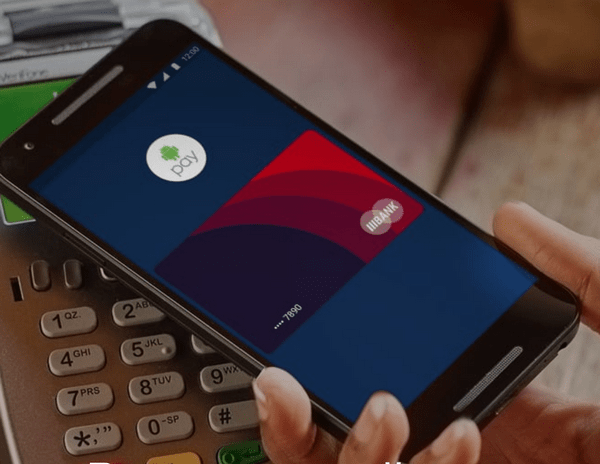
Today, a bank card issued in the “Wallet” can pay for purchases in stores that accept MasterCard PayPass cards around the world, and Internet access on the phone is not required for this. Bank terminals at such points of sale are marked with a contactless payment logo (an oval logo with waves to the right), which is placed exactly in the place where the antenna is located in the reader, and it is necessary to apply the phone (where the antenna is located in its case) to this logo, even if it’s on the terminal screen.
The location of the antenna varies depending on the phone model. For example, in Philips Xenium W336 and Philips Xenium W5888 smartphones, the antenna is located just below the center of the back panel, but in HTC One it is located higher – behind the rear camera, since the phone case is metal, the radio signal passes through narrow plastic sections in the shape of the letter “T”. “.
Bank terminals equipped with contactless readers have 4 color indicators. The first means ready for work, the second means reading, the third means reading is completed and you can remove the card, and the fourth is the result of reading.
When paying with a bank card on your phone, just like when paying with a regular plastic card, you may be asked to enter a PIN code (which can be obtained by calling the bank) or to sign a check. For purchases under RUB 1,000, neither a PIN nor a signature is required.
Instead of conclusion
Perhaps the best part about NFC is that the technology is available to a wide range of users. More and more manufacturers do not leave their smartphones without NFC, so it is available in devices like
(for $321.99 with code Mi5SGBS until 31.12) and
, and in flagships like
. The diversity is also pleasing
What about Apple and its iPhone 7, you ask? Alas, the manufacturer limits the operation of the NFC chip in its smartphone, and it can only be used for the Apple Pay payment system. In the fall, however, it launched in Russia, so at least some plus.
How do you use NFC in your daily life? Share your experience with us in the comments.
Wallet app
The “Wallet” application is not an electronic wallet or payment system, as, say, the well-known Visa QIWI Wallet and analogues. “Wallet” is primarily a universal interface to applications (cards) in Secure Element. Thanks to this approach, the phone becomes a “universal interactive plastic card.”
The main role of the application is to display issued or available cards and provide a communication channel between Secure Element and TSM. Also, “Wallet” gives the user the ability to interactively manage the cards loaded in the Secure Element.
The application is pre-installed on compatible phones at the factory or added with a software update for such phones (at the time of writing, these are HTC One, Philips W8555 and Philips Xenium W336, and HTC One Dual SIM, HTC One Max, HTC will be added soon One SV, HTC Desire 500 and HTC Desire 600). Other models and manufacturers will appear later.
The first card that is available in the Wallet today is a prepaid bank card from TCS Bank. “Prepaid” means that the card is issued without concluding a written agreement with the bank, is not associated with your other cards in the bank, and also, in accordance with the legislation of the Russian Federation, has restrictions on one transaction (no more than 15,000 rubles) and the total amount of transactions per month ( no more than 40,000 rubles). When the user’s application for issuance is fulfilled, the card is delivered to the phone within 10 minutes on average.
The bank card loaded into Wallet is not virtual, as much as we would like to use this term for an intangible card. After personalization and activation, the card really exists “physically” in the phone and interacts with the terminal at the checkout in the store in the same way as its plastic progenitor, and the banking term “virtual” is used for cards intended exclusively for payments on the Internet, and does not imply interaction with physical infrastructure and many other functions of card products.
Any card in any phone
Payment cards are not transferred to the phone, are not linked or duplicated, but are issued. To issue a card, the service provider must connect to the TSM and the TSM must have access to the Secure Element. Therefore, today it is still impossible to issue any card to any phone, but the movement is going in this direction.
https://www.youtube.com/watch?v=Tvf5bvNuD_4
Interest is observed among all participants in the process: phone manufacturers who need new interesting functionality, and cellular operators, and service providers who need a new audience, and, most importantly, users who are tired of the heaviness of plastic cards in their wallets. Issuing cards to your phone will soon become as commonplace as taking photos or browsing the Internet.
Lyricist: Konstantin Savchenko