 NFC Expert
 General and technical data
General Information
- Manufacturer: Toshiba
- Product code: SD-T008NFC(6
- Country of origin: Japan
- Warranty: 5 years
Specifications
- Memory card type: SDHC NFC
- Speed classes: UHS-I (U1), Class 10
- Volume: 8 GB
- Declared write speed: 10 MB/s
- NFC standard: NFC Forum Type 3 Tag compliant (ISO/IEC 18092)
- Frequency: 13.56 MHz
https://www.youtube.com/watch?v=ytpressru
Storage and operation conditions
- Operating Temperatures: -25 to 85°C
- Storage temperatures: -40 to 85°C
Package dimensions
- Length: 124 mm
- Width: 103 mm
- Height: 5 mm
Packaging and equipment
The packaging is typical for these types of storage media — a blister with a memory card is located inside a two-layer cardboard base with a Euro slot.

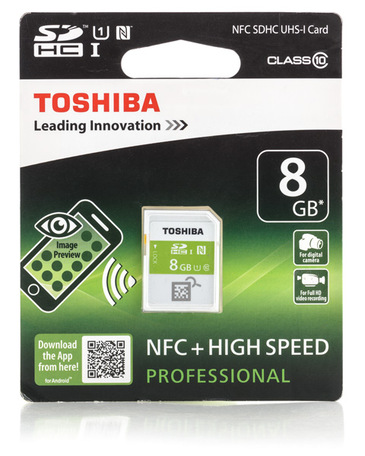
On the front side, the manufacturer (Toshiba), storage capacity (8 GB), card type (SDHC) and speed classes – UHS-I (U1) and Class 10 are indicated, the NFC sign has also been added to the icons.
The left side indicates the presence of an additional function for previewing images on an NFC-enabled mobile device, below is a QR code for downloading the application, but the link leads to the product page on the company’s website. The utility must be downloaded from Google Play.
Full HD camcorders and digital cameras are indicated by the manufacturer as the intended application area.
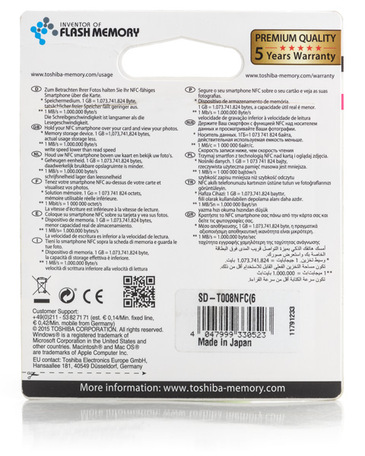
On the reverse side there is a phrase that to view the data you need to bring an NFC-enabled smartphone over a memory card, and also indicate the units of speed and capacity:
- Speed: 1 MB/s equals 1,000,000 bytes/s
- Capacity: 1 GB equals 1,073,741,824 bytes
It is surprising that the value of binary gigabyte (aka gibibyte) is used in the capacity measurement, which is fundamentally different from the established practice, in which the declared volume is indicated based on the ratio of 1 GB equals 1 billion bytes.
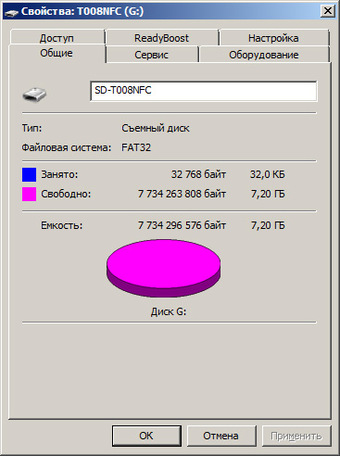
According to the packaging, the real capacity of the memory card should be 8 gibibytes (that is, 8 billion 589 million 934 thousand 592 bytes), but the phrase “actual usable capacity is less” clearly indicates that the manufacturer made a mistake in indicating the units of quantity information, which was confirmed when the device was connected. The data on the manufacturer’s website is correct.
The sticker shows the country of manufacture, as well as the barcode and product code SD-T800NFC(6 – with exactly one open bracket. The device is made in Japan, seeing the name of this country on digital devices is becoming quite rare.
The scope of delivery includes only the memory card itself.
Appearance
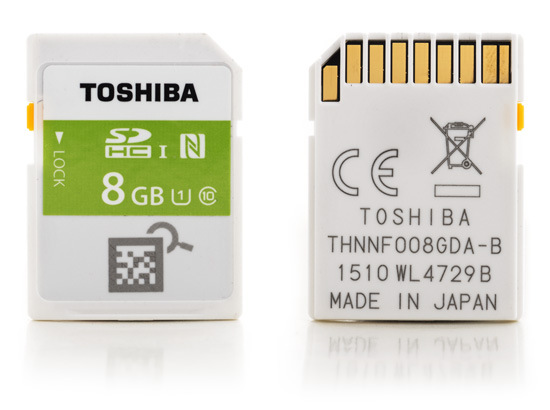
The ID sticker occupies two-thirds of the front and contains the Toshiba logo, capacity (8 GB), speed classes, and the NFC symbol.
The bottom third contains a 2D matrix barcode printed directly on the body of the device. The barcode contains a unique identifier of the storage medium, which can be read using a proprietary application. Presumably the barcode type is Vericode.
The reverse side shows the manufacturer, the country of production (Japan), as well as 11- and 13-digit alphanumeric numbers.
Testing
Test stand:
- CPU: Intel Core 2 Quad Q8300, 2500 MHz
- Motherboard: ASUS P5E64 WS Evolution (X48, ICH9)
- RAM: 4 × 2GB Kingston DDR3 1333MHz (8GB total)
- System disk: Maxtor STM3160318AS 160 GB, 7200 rpm
- PSU: Corsair RM850
- USB 3.0 controller: Orient VL-3U2PE (connected to the first PCI-E x16 slot)
- Memory card reader: Transcend RDF5 with USB 3.0 interface
Software:
- Operating system: Windows 7×64 Professional SP1
- Orient VL-3U2PE Controller USB 3.0 Driver: VIA XHCI Driver 4.70C AP
Set of test programs:
- CrystalDiskMark 3.0.3 x64
- AS SSD Benchmark 1.8.5636.37293
- H2testw 1.4
- USB Flash Benchmark
https://www.youtube.com/watch?v=ytdevru
Testing method:
- Testing was carried out in the FAT32 file system.
- The drive was completely overwritten three times by the H2testw program before the start of the tests (with measurement of speed characteristics).
- The memory card was 50% full during tests.
- Tested with Transcend RDF5 card reader, which supports SDHC UHS-I memory cards (firmware version TS37).
CrystalDiskMark
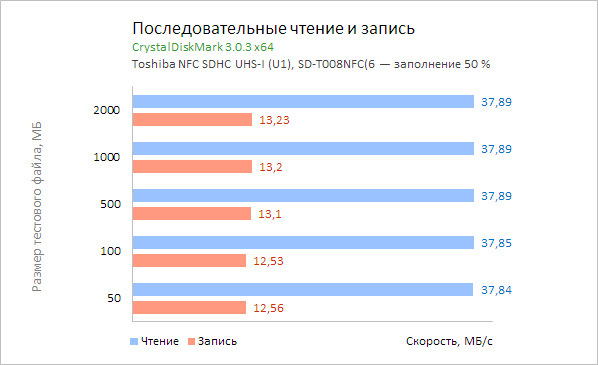
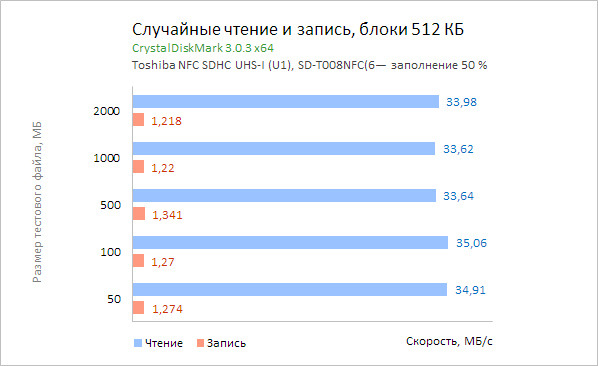
Testing was carried out with random data samples (the parameter is set by default) on volumes of 50, 100, 500, 1000 and 2000 MB. The number of runs of each test is three repetitions. The program provides results in decimal units.
Serial data rates are the main parameters when evaluating the speed characteristics of memory cards.
The linear read speed on all data volumes is reduced to almost one value – 37.9 MB / s. The maximum write speed was obtained on volumes from 500 MB and corresponds to 13.2 MB / s, on sizes 50 and 100 MB the speed is slightly lower (12.5 MB / s).
Random reads in 512KB blocks are slower than sequential speeds of 3-4MB/s, and random writes in blocks of the same size are less than 1.4MB/s.
Random reads and writes in 4K blocks are limited to 2.3MB/s and 1MB/s, respectively.
AS SSD Benchmark
AS SSD Benchmark tested only serial data rates with a test file size of 1 GB.
The read and write speed results are recorded at 36 MB/s and 12.5 MB/s, respectively, which is 5-6% lower than the results of a similar test by CrystalDiskMark.
H2testw
The graph shows the results in binary units after three full cycles of overwriting the capacity of the memory card: read speed was 34.4 MB/s, write speed was 11.2 MB/s. When converted to decimal units, the speeds are 36 and 11.7 MB/s, respectively.
USB Flash Benchmark
The program measures sequential writes and reads of data blocks ranging in size from 1 KB to 16 MB. Blocks are conditionally divided into three groups and are tested on files of the appropriate size: 1, 10 or 100 MB. Each speed indicator is measured three times, after which the average value is displayed and the speed graph is plotted.
https://www.youtube.com/watch?v=ytaboutru
The graph of the results of the program does not contain exact values, therefore, based on the measurements recorded in the test log, the corresponding speed diagrams are built.
The maximum stable read speed (36 MB/s) was recorded for block sizes from 64 KB to 16 MB, the write speed limits (more than 10 MB/s) were recorded for blocks from 512 KB.
Memory Card Preview App
The peculiarity of the memory card and its extended functionality are revealed using the proprietary Memory Card Preview application for an NFC-enabled Android smartphone (or tablet).
Toshiba NFC memory card application must be downloaded from Google Play, only Android operating system 4.0 and higher is supported.
1. Locating the NFC sensor
When you launch the app for the first time, you will be prompted to locate the NFC sensor on your mobile device. To do this, you need to move the SD card sector-by-sector until the connection is made.
2. Download thumbnail images.
After the connection is established, the download of data begins, after which the silhouette of the memory card appears in the center of the screen.
The name of the device is displayed at the top (it can be changed), at the bottom is the period in which the photos were taken. The area shaded in green reflects the fullness of the storage medium. The “i” control allows you to see more accurate data regarding the used capacity of the device (more on that below).
Photo previews appear around the silhouette of the memory card, the maximum number is 16. This is the maximum number of images that can be obtained from a memory card, regardless of its content with material.
Only JPEG photos are read, the location of which complies with the DCF specification, which defines the file system for digital cameras – that is, the DCIM top directory, then subdirectories with a specific name mask, etc.
3. View and share thumbnails
When you click on a fragment of a frame, the entire preview is displayed, under which the date the file was created is indicated. After the next press, it becomes possible to transfer the selected thumbnail.
The maximum preview resolution is 160 by 120 pixels, and the size does not exceed 20 KB. These images are not generated on the fly, but ready-made ones are taken from EXIF, which, according to the standard, provides for their presence. Therefore, the presence of EXIF data is a prerequisite for displaying a picture, other data is not taken, even the date of shooting – instead, the date the file was created is used.
4. Information about filled and free space
After clicking on the “i” element, the information about the available and filled capacity appears. The occupied space is divided between two categories:
- Photos (JPEG only)
- Video & Other (videos and other types of data, including RAW files).
At the top of the screen there is a field with a name that can be changed. In addition, the date of the last update of information about the memory card is noted, as well as the period in which the photos were taken.
The total list of memory cards consists of 20 fields. In the lower right corner there is a control that starts the procedure for finding the location of the NFC sensor (as when the application is first launched).
5. Determination of the selected storage medium
To the right of the name of the memory card there is an icon that starts the definition (search) of the selected storage medium. This function is implemented through the camera of a mobile device and a two-dimensional barcode on the body of the memory card.
After identification, the name of the memory card, the number in the application, and one photo appear over the image of the memory card. After clicking, information about the card that was entered into the application earlier is displayed. Thus, the function allows you to find the media you need, it makes sense if you have two or more Toshiba memory cards with NFC support.
Conclusion
Toshiba NFC SDHC Memory Cards are available in 8GB, 16GB, and 32GB, and are equipped with an NFC module to determine the available space and data stored on the media.
https://www.youtube.com/watch?v=ytadvertiseru
According to the author’s experience, such a task is relevant, for example, during long business trips or tourist trips. The arsenal of a photographer or cameraman, as a rule, consists of cards of different characteristics and capacities, and depending on the nature of the upcoming shooting, certain information carriers are installed. Reportage – fast memory cards, landscape shooting – a slower, but voluminous card is enough, etc. Thus, we have a set of different memory cards with different contents of material.
In this case, the possibility of obtaining information through a smartphone, which a modern person always has at hand, is not without meaning, but it is worth considering one point – if you have, for example, 10 ordinary memory cards and one NFC-enabled card, the task is not is simplified. To obtain practical value, several NFC memory cards are required, which is also noticeable when evaluating the functionality of a mobile application.
In terms of speed characteristics, according to the results of testing the 8 GB version, the read and write speeds did not exceed 38 and 13.5 MB / s, respectively, while the write speed was slightly higher than that declared by the manufacturer. According to the data received, the information carrier belongs to the middle segment.
https://www.youtube.com/watch?v=ytpolicyandsafetyru
The shortcomings noted relate to the capabilities of the mobile application – this is the lack of support for RAW files, a limited number of received images (16 in total), low resolution thumbnails.