 NFC Expert
 Types of NFC tags
There are four types of tags described by the NFC forum, all based on RFID protocols. This makes NFC tags partially compatible with many existing RFID systems (eg Mifare and FeliCa). Although these older systems do not support NDEF, they can still recognize NFC tags that are compatible with them.
For example, an RFID reader that is designed to work with Mifare Ultralight tags can read the ID number of an NFC type 2 tag, although it cannot read NDEF encoded information. There is also a fifth type that is compatible with the technology but is not part of the NFC specification.
Types 1, 2 and 4 are based on GOST R ISO/IEC 14443A (consists of four parts: 1, 2, 3, 4), type 3 is based on GOST R ISO/IEC 18092. More details about each of the types can be read under the spoiler.
NFC algorithm
It is based on the principle of electromagnetic induction. N FC tags are electromagnetic coils that do not have their own energy source. For current to occur, they must fall within the range of an active device with a module capable of reading information. Data volumes are small. More often, this is a recorded algorithm that allows you to run a certain function on a smartphone. For example:
- Turn the Wi-Fi module on or off.
- Launch Bluetooth protocol.
- Follow the link in the browser.
- Adjust speaker volume.
- Change the brightness level of the phone screen.
- Transfer of owner data.
- Transmission of a code that acts as a pass or key.
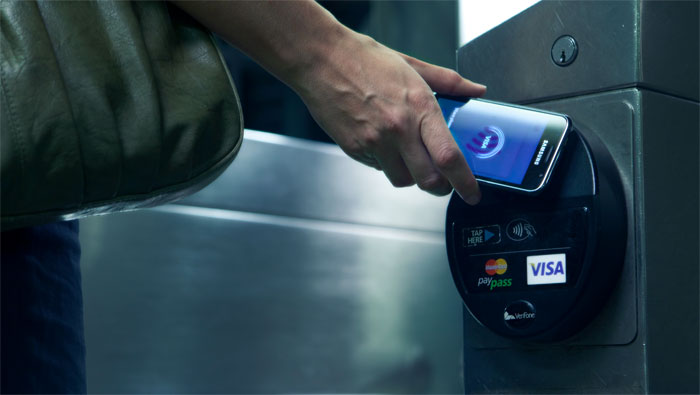
- Bank cards with NFC are used to pay at terminals.
NFC, like RFID, has an initiator and a target in the exchange, but the new technology allows much more than a simple exchange of an identifier and reading or writing information of the target. The most significant difference between the two technologies is that NFC targets are often programmable devices such as smartphones. This means that it is possible to exchange not only static data, but also generate a response to the information requested by the initiator each time.
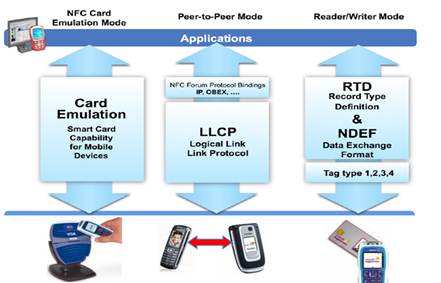
NFC devices have two interaction modes. If the initiator emits radio frequency waves, and the target is powered by the initiator, then this mode of interaction is called passive. In active mode, the initiator and target have their own power supplies and are independent of each other. These modes are the same as RFID modes.
NFC devices also have three ways of working. They can work in the mode of reading information from the target or writing to it. They can emulate cards by acting like RFID tags when they are in the field of another NFC or RFID device. Or they can operate in peer-to-peer (P2P) mode, in which they exchange data in both directions at once.
The first main difference between NFC and RFID is the peer-to-peer interaction method, which is implemented using GOST R ISO / IEC 18092. P2P data exchange is implemented by two protocols – the logical link control protocol (LLCP) and the simple NDEF exchange format (SNEP).
Types of NFC tags
There are four types of devices. The first two support overwriting. The third and fourth are recorded once and are not subject to further changes. There are differences in the speed of data exchange and in the amount of information stored.
Programmable
Any operation is possible with this type of device:
- writing new data;
- formatting and full cleaning;
- it is possible to copy information to other tags.
A huge amount of software has been developed, available in the Play Store, which allows you to carry out any operations using the built-in smartphone module. There are paid and free versions. The principle of operation and functionality is approximately the same.
There are overwrite protected chips. By purchasing a blank sample, available for one-time programming, the owner uses its function constantly.
There are already pre-programmed sets of various tags that perform a certain action. Often they are marked with the corresponding logos. Some turn Wi-Fi on and off, others turn Bluetooth. Sold in sets for non-programming users.
Compatibility
Different types of chips and devices can work on different NFC data transmission protocols. This is where the compatibility issue comes in.
To avoid problems, tags marked NTAG should be selected. They are compatible and work correctly with all devices on the Android operating system.
When the standards are incompatible, it is almost impossible to do anything. You can try to return them to the seller.
Writing to tags
How to use the recording application is described in many forums. There are video instructions that describe the process for individual programs and devices.
Programming is carried out in several stages:
- You need to activate the function in the device settings.
- Launch the NFC tag application.
- Attach the NFC chip to the device.
- Select action. You can program an entry or a task. Recording involves launching the application, the task is changing the device settings.
Despite the great popularity among users, the technology continues to improve. NFC has the potential for growth and development.
NFC architecture

There are several layers in the NFC architecture. The lowest of them is the physical one, which is implemented by the CPU and other hardware complex through which the interaction takes place. In the middle is the packet data and the transport layer, then the layer data format, and finally the software.
At the physical layer, NFC works according to the algorithm described in GOST for RFID (GOST R ISO / IEC 14443-2-2014), which refers to low-power radio signals with a frequency of 13.56 MHz. Then comes the level that describes the breakdown of the data stream into frames (GOST R ISO / IEC 14443-3-2014). Any radio controllers that are used in a phone, tablet, or connected to a computer or microcontroller are separate hardware components.
They communicate with the main processor through one or more standard serial protocols between devices: universal asynchronous transceiver (UART), serial peripheral interface (SPI), serial data bus for integrated circuit communication (I2C), or universal serial bus (USB) .
Above this are several RFID command protocols based on two specifications. N FC tag reading and writing is based on the original RFID GOST R ISO/IEC 14443A. The Philips/NXP Semiconductors Mifare Classic and Mifare Ultralight and NXP DESFire protocols are compliant with GOST R ISO/IEC 14443A. P2P NFC data exchange is based on GOST R ISO/IEC 18092.
They are depicted in the figure above on a level with other control protocols, since they use the same standard.
NDEF Structure
NDEF is used to format exchange data between devices and tags. This format typifies all messages that are used in NFC, and it does not matter for the card or for the device. Each NDEF message contains one or more NDEF entries. Each of them contains a unique record type, an identifier, a length, and a field for the information to be reported.
There are several common types of NDEF records:
- Plain text entries. Any string can be sent to them, they do not contain instructions for the target, but contain metadata about the language of the text and the encoding.
- URI. Such records contain data about Internet links. A target that receives such an entry will open it in an application that can display it. For example, a web browser.
- Smart recording. Contains not only web links, but also a text description for them, so that it is clear what is located on this link. Depending on the recording data, the phone can open the information in the desired application, be it SMS or e-mail, or change the phone settings (sound volume, screen brightness, etc.).
- Signature. It allows you to prove that the information that has been transmitted or is being transmitted is reliable.
You can use multiple record types in one NDEF message.
You can think of a message as a paragraph and notes as sentences. A paragraph is a specific unit of information that contains one or more sentences. Whereas a sentence is a smaller unit of information that contains just one idea. For example, you can make birthday invitations in the form of a paragraph and write information about the date, time and place of the event in separate sentences, and use NDEF messages to send friends a reminder of this event, where there will be a text message describing the event, a smart entry with a place and a web link on how to get to that location.
The second main difference between NFC and RFID is the NFC data exchange format (NDEF). N DEF defines the format of data in messages, which in turn consist of NDEF records. There are several types of records, which will be discussed in more detail below. N DEF makes it possible to use code to control the process of reading and writing NFC tags, peer-to-peer communication, and card emulation.
NDEF contains information about the byte representation of messages that can contain multiple entries. Each entry has a header that contains metadata (type, length, etc.) and information to send. If we return to the analogy with the paragraph, then the paragraph is formed from sentences related to the same topic, and in NDEF messages – it’s good when all entries relate to the same topic.
NDEF messages are mostly short, each exchange consists of one message, each label also contains one message. Since the exchange of NFC data occurs when one device is touched by another or by a label, it will be inconvenient to transmit the text of an entire book in one message, so the length of an NDEF message is comparable to the length of a paragraph, but not the entire book.
An NDEF record contains information to forward and metadata on how to interpret this information. Each entry can be of a different type, which is announced in the title of that entry. The header also describes what place the record occupies in the message, after the header information follows. The figure below shows complete information about the location of bits and bytes of information in the NDEF record.
The space for information in an NDEF record is limited to 2^32-1 bytes, but you can chain records within a message to send larger information. In theory, there are no restrictions on NDEF messages, but in practice, the message size is limited by the capabilities of the devices or tags involved in the exchange of information.
If only devices are involved in the exchange, then the length of the message will be limited by the computing power of the weakest of the devices, but it is worth considering that the devices will have to be kept nearby for a long time to send all the data. When the smartphone and the card interact, the length of the message will be limited by the memory size of the card.
In general, data exchange via NFC is quite fast. The person brings the mobile device to the tag, there is a brief exchange of information, and the person moves on. This technology was not designed for long exchanges of information, because the devices literally have to be a couple of centimeters apart.
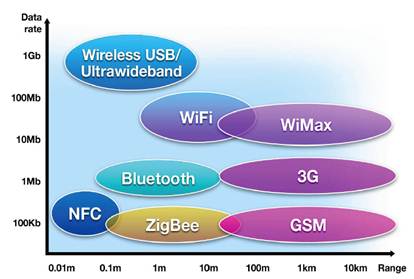
In order to transmit a large amount of information, the devices will have to be kept next to each other for a long time, which can be inconvenient. If you need a long interaction between devices, then you can use NFC to quickly exchange data about the capabilities of devices and then turn on one of the more suitable data transfer methods (Bluetooth, Wi-Fi, etc.).
When an Android phone reads an NFC tag, it first processes and recognizes it, and then transfers the data about it to the appropriate application for the subsequent creation of an intent. If more than one application can work with NFC, the application selection menu will appear. The recognition system is defined by three intents, which are listed in order of importance from highest to lowest:
- ACTION_NDEF_DISCOVERED: This intent is used to start an activity if the label contains an NDEF message. It has the highest priority and the system will run it first.
- ACTION_TECH_DISCOVERED: If no activity is registered for an ACTION_NDEF_DISCOVERED intent, then the recognition system will try to launch an application with that intent. Also, this intent will be fired immediately if the found NDEF message does not match the MIME type or URI, or the label does not contain a message at all.
- ACTION_TAG_DISCOVERED: This intent will fire if the previous two intents failed.
In general, the recognition system works as shown in the figure below.
When possible, the ACTION_NDEF_DISCOVERED intent is fired because it is the most specific of the three. Moreover, with its help it will be possible to launch your application.
If an activity is launched due to an NFC intent, then you can get information from the scanned NFC tag from this intent. Intent may contain the following additional fields (depending on the type of scanned tag):
- EXTRA_TAG (mandatory): Tag object describing the scanned tag.
- EXTRA_NDEF_MESSAGES (optional): Array of NDEF messages calculated from the label. This extra field is specific to the ACTION_NDEF_DISCOVERED intent only.
- EXTRA_ID (optional): Low-level label ID.
Below is an example that checks the intent ACTION_NDEF_DISCOVERED and gets NDEF messages from the extra field.
Kotlin
 override fun onNewIntent(intent: Intent) { super.onNewIntent(intent) . if (NfcAdapter. ACTION_NDEF_DISCOVERED == intent.action) { intent.getParcelableArrayExtra(NfcAdapter. EXTRA_NDEF_MESSAGES)?also { rawMessages -{amp}gt; val messages: List = rawMessages.map { it as NdefMessage } // Обработка массива сообщений. . } }
}
@Override
protected void onNewIntent(Intent intent) { super.onNewIntent(intent); . if (NfcAdapter. ACTION_NDEF_DISCOVERED.equals(intent.getAction())) { Parcelable[] rawMessages = intent.getParcelableArrayExtra(NfcAdapter. EXTRA_NDEF_MESSAGES); if (rawMessages != null) { NdefMessage[] messages = new NdefMessage[rawMessages.length]; for (int i = 0; i {amp}lt; rawMessages.length; i ) { messages[i] = (NdefMessage) rawMessages[i]; } // Обработка массива сообщений. . } }
} Kotlin
val tag: Tag = intent.getParcelableExtra(NfcAdapter. EXTRA_TAG)
Tag tag = intent.getParcelableExtra(NfcAdapter.EXTRA_TAG);
There are several methods for creating an NDEF entry: createUri(), createExternal() and createMime(). It is better to use one of them in order to avoid errors that may occur when creating a record manually. All examples below should be sent as the first message when writing a tag, or by pairing with another device.
Kotlin
Using NFC
There are many ways to use NFC:
- Card emulation mode allows you to use this technology for contactless payments, such as Google Wallet, or to pay or receive tickets on public transport.
- There are several mobile applications that allow you to save the settings for the mobile device on the tags and later use them to quickly change any settings of the mobile device (switching to vibrate mode, turning Wi-Fi on or off on the mobile device).
- Devices that support NFC are gradually appearing on the market – stereo systems, TVs that allow you to pair with a phone or tablet for remote control.
- NFC is used in the healthcare system to store patient ID and personal records.
- In the field of inventory management, NDEF records can be used to store information about the place of departure of goods, about their passage through various intermediate points, and the like.
Conclusion
NFC technology adds promising functionality to RFID technology. The most significant innovation is the NFC Data Interchange Format (NDEF), which provides the ability to format regular data into one of four NFC tag technologies. N DEF can be used both for data exchange between a device and a tag, and for exchange between devices. This makes NFC suitable not only as a method of identification, but also as a means of exchanging short blocks of data.
For more information about NFC or NDEF, see Tom Igoe, Don Coleman, and Brian Jepson Beginning NFC. Near Field Communication with Arduino, Android, and PhoneGap.